
nashi Team
6 min read
A retail point of sale (POS) system is where a customer commits to a purchase. It's more than a cash register; it's the command centre for your retail operation. This system is critical for making sales and reaching your business goals.
What a Retail Point of Sale System Really Does
A POS is the heart of your business. Each tap, swipe, or scan pumps vital information through your operations. It’s where money and products officially change hands, but a modern system does much more.
It connects your sales floor, stockroom, and accounting into one clear picture. This gives you a live look at your business performance. You can then make smart decisions based on data, not guesswork.
From Cash Register to Business Brain
The old-school cash till was a simple box for holding cash. A retail point of sale system, by contrast, is the brain of your business. It helps you understand why sales happen, not just that they did.
Imagine a S$9.00 latte and croissant purchase in your Singapore café. That single transaction triggers a chain reaction in a good POS. It securely processes the payment, prints a receipt, and updates your inventory.
The system automatically deducts one croissant, milk, and espresso beans from your stock. That S$9.00 sale is logged into your daily and weekly reports. This automation saves time and cuts down on costly human error.
More Than Just Transactions
A great retail POS system provides business intelligence once reserved for large corporations. It shows you which items are best-sellers and identifies your peak hours. It can even recall a loyal customer's favorite order.
A great POS system shifts your focus from just processing sales to understanding the story behind them. It answers key questions: What are my customers buying? When are they buying it? And who are my most valuable customers?
This data is gold for any Singaporean entrepreneur. It changes the POS from a payment machine into a strategic partner. Getting this right is the first step toward choosing a solution that helps you grow.
What's Really Inside a POS System? The 3 Core Parts
Every POS system is built from three essential parts. Understanding these components helps you choose what your shop actually needs. Think of it like a car: you need the body (hardware), engine (software), and fuel (payment processing).
Part 1: Hardware – The Physical Kit
This is all the gear you can see and touch at your counter. It used to mean a clunky cash register, card terminal, and receipt printer. You still see this setup in large supermarkets across Singapore.
Today, your hardware could be as simple as a smartphone or tablet. It can be paired with a tiny, pocket-sized card reader. The right hardware depends entirely on where and how you sell.
Your typical hardware toolkit might include:
A Main Device: A touchscreen terminal, laptop, iPad, or smartphone.
A Card Reader: To accept credit/debit card swipes, chips, and contactless taps.
A Receipt Printer: For customers who want a physical transaction copy.
A Barcode Scanner: To speed up checkout by scanning items instantly.
A Cash Drawer: A secure, lockable drawer for notes and coins.
Part 2: Software – The Brains of the Operation
If hardware is the body, software is the mind running the show. It's the app on your device that rings up sales, tracks stock, and generates reports. This software tells you how your business is truly performing.
Great software is a silent partner that collects priceless data with every tap. It knows what you sold, when you were busiest, and your remaining inventory levels. This information is vital for making smart decisions about reordering and promotions.
The best POS software is like having a real-time dashboard for your entire business. It turns a flood of sales data into clear, simple insights, showing you what's flying off the shelves and what isn't—no spreadsheets required.
Part 3: Payment Processing – The Money Mover
Payment processing is the secure service connecting your business, your customer’s bank, and your bank. When a customer taps their card, the processor checks for funds and ensures the money lands safely with you.
This process must be fast, reliable, and secure to protect against fraud. Processors offer different rates and supported cards (Visa, Mastercard, AMEX). A guide on credit card readers in Singapore can help you get up to speed.
A Real-World Look: Traditional vs. Cloud vs. SoftPOS
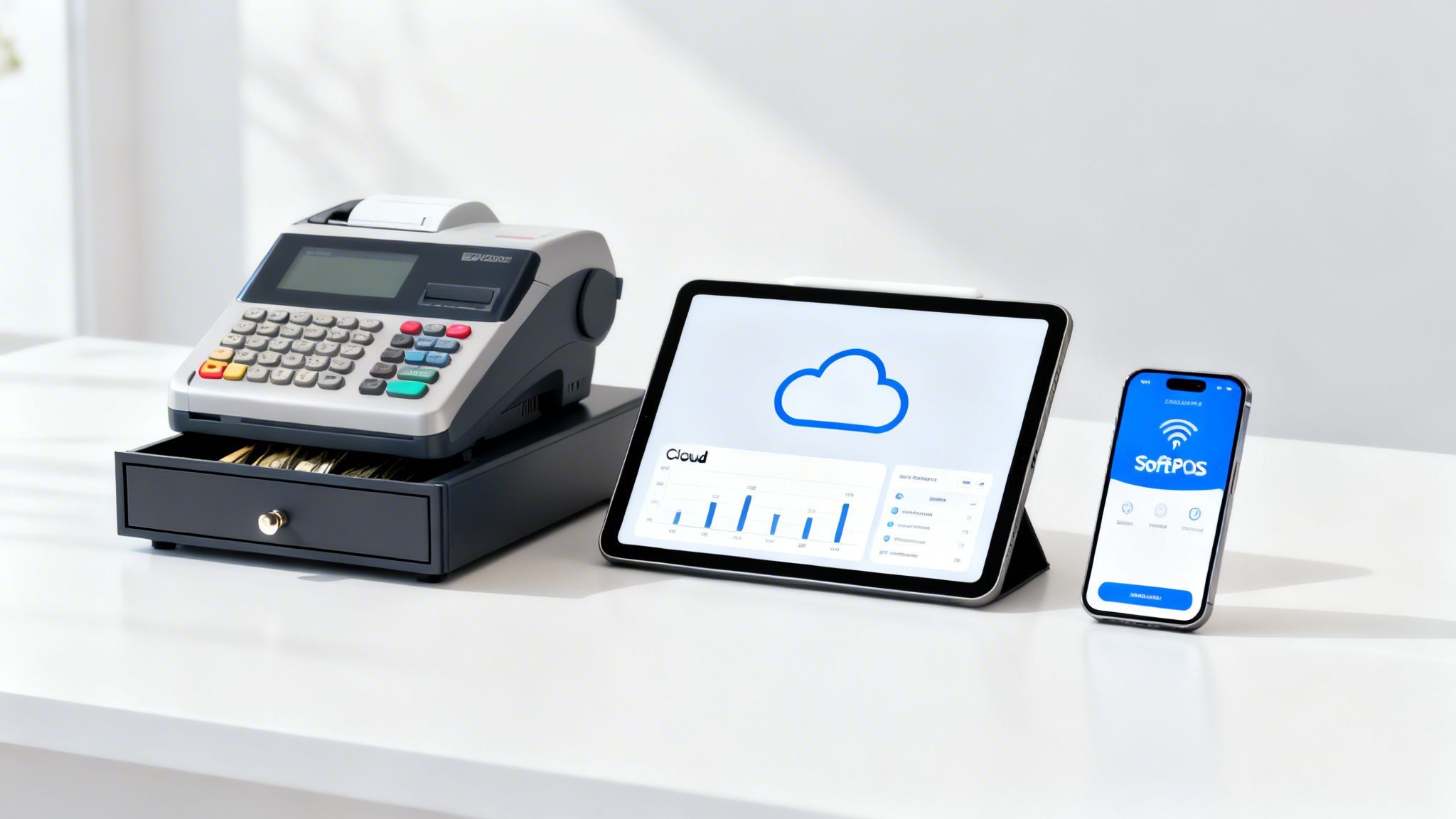
Choosing the right retail point of sale system doesn't have to be a headache. Not all systems are built for Singapore's dynamic small business scene. Let's break down the three main types to see which fits your business best.
The Traditional EPOS: The Countertop Classic
A Traditional EPOS (Electronic Point of Sale) is the classic checkout counter system. These are the sturdy workhorses found in supermarkets and department stores. They are built to handle high transaction volumes in one fixed spot.
These systems require a large upfront investment in specialized hardware. They often run on local servers, which means they work even if your Wi-Fi is down.
That reliability comes at the cost of flexibility. These systems are bolted to the counter, making them unsuitable for mobile businesses or pop-up stalls.
The Cloud POS: Flexibility Meets Function
Cloud POS systems offer a huge leap forward in freedom. The software lives "in the cloud," so you can log in from anywhere with an internet connection. This lets you check sales data and run your business remotely.
The hardware is also more flexible, running on everyday gadgets like an iPad or laptop. You still need a separate card reader to take payments. Your setup is no longer chained to one spot.
This model is a perfect match for cafes and small boutiques. It's the sweet spot between powerful inventory tools and modern mobility.
In Singapore’s buzzing retail scene, point-of-sale transactions made up a whopping 60% of all payments in 2024. The market is projected to hit USD 37.28 billion by 2030, making agile solutions key to growth. You can dive deeper into these insights with Cushman & Wakefield's analysis on Singapore retail trends.
The SoftPOS: The Ultimate Mobile Solution
SoftPOS (Software Point of Sale) is the newest and leanest option. It turns a regular smartphone into a full-blown payment terminal. You can accept contactless card payments directly using the phone's built-in NFC chip.
This is a game-changer for micro-merchants and mobile businesses. A personal trainer, market vendor, or home baker can use a SoftPOS app like nashi. Just key in the amount, and the customer taps their card or phone to yours.
The biggest wins are zero hardware cost and incredible mobility. It is the most affordable and direct way to start accepting card payments. Explore a full breakdown of the best mobile POS systems in Singapore.
POS System Comparison for Small Businesses
This table compares the factors that matter most to a small business owner in Singapore.
Feature | Traditional EPOS | Cloud POS | SoftPOS |
|---|---|---|---|
Upfront Cost | High (S$1,000+ for hardware) | Moderate (Tablet/Laptop cost) | None (Uses your phone) |
Mobility | Low (Fixed to counter) | Medium (Portable within Wi-Fi) | High (Works anywhere with data) |
Hardware | Bulky, dedicated terminal | Tablet + separate card reader | Just a smartphone |
Best For | Large, high-volume retail stores | Cafes, boutiques, small restaurants | Pop-ups, freelancers, mobile services |
The best choice depends on how and where you do business. There is no single "best" POS, only the one that is best for you.
Frequently Asked Questions
1. What is the difference between a POS system and a cash register?
A cash register only records sales and holds cash. A retail POS system also tracks inventory, manages customer data, and provides detailed sales reports, acting as a complete business management tool.
2. Which POS is cheapest for a new business?
A SoftPOS is the most affordable way to get started. With no hardware to buy and often no monthly fees, you just pay a small percentage on each transaction. It's perfect for testing a business idea without a big financial risk.
3. Do all POS systems track inventory?
Most do, but the level of detail varies. Traditional and Cloud POS systems offer advanced inventory management. SoftPOS solutions typically focus on core sales data, which is often enough for service-based or small-inventory businesses.
4. Can I use my own tablet or laptop for a POS system?
Yes, Cloud POS and SoftPOS systems are designed to run on common devices like iPads, Android tablets, laptops, and smartphones. This flexibility helps you avoid the high cost of specialized hardware.
5. Do I need an internet connection for my POS to work?
It depends. Traditional EPOS systems run locally and don't need internet for sales. Cloud POS and SoftPOS systems require an internet or mobile data connection to process payments and sync data.
When a Full POS System Is Overkill
New business owners often think they need a comprehensive retail point of sale system from day one. They see established shops with fancy terminals and assume it's a requirement.
For many sole proprietors, a full-blown POS is overkill. The cost, complexity, and effort outweigh the actual needs. All those extra bells and whistles are just noise.
When a Full POS Makes Perfect Sense
A powerful retail point of sale system is a game-changer for businesses dealing with complexity. If you run a boutique with multiple outlets, you need to track thousands of SKUs and manage staff. A full POS is your mission control.
The same applies to a busy F&B spot. You need to juggle table management, send orders to the kitchen, and split bills. A proper POS isn't a "nice-to-have"—it's the heart of your operation.
Warning Signs of POS Overkill
How do you know if you're about to buy a system that's too much for you? If your business is service-based, you don't need complex inventory management. If you're a one-person show, you don't need advanced staff permissions.
The real goal is to find a solution that fits the business you have today, not the one you dream of having in five years. Paying for features you never touch is one of the fastest ways to burn through your hard-earned capital.
Spotting these signs early stops you from getting sold a system that complicates your life.
Scenarios Where Simple Is Smarter
For many Singaporean entrepreneurs, the main challenge is simply getting paid. The real need is for simple, reliable in-person card payments. A steep learning curve and high costs are unnecessary burdens.
Here are a few examples where a simple solution is the perfect fit:
The Personal Trainer: You need a fast way to accept payment right after a session.
The Weekend Market Stall: You need a totally mobile way to take payments with no power outlet.
The Freelance Consultant: You need to take a deposit on the spot to kick off a project.
The Home-Based Baker: You need a secure way to take card payment upon pickup.
In these cases, a lightweight SoftPOS app like nashi is the perfect tool. It turns your existing phone into a card terminal. This lets you accept payments anywhere without features you'll never use.
How to Choose Your First Payment Solution
Choosing a payment solution boils down to a simple checklist. Focus on factors that directly affect your daily operations and bottom line. This will help you find a partner that helps you grow.
Scrutinise the Pricing Model
You must look past the marketing to see the real numbers. A solution that looks cheap can drain profits with hidden fees. Find a provider who is transparent about their pricing.
Look for a simple, clear per-transaction fee. Avoid confusing tiered rates, monthly charges, or setup costs. Predictable costs are critical for managing cash flow in a small business.
Key takeaway: A great payment partner doesn't play games with their fees. If you have to dig through fine print to figure out charges, that's a huge red flag. Simplicity is a sign of respect for small businesses.
A pay-as-you-go model is almost always the best bet when starting out. You only pay when you make a sale. Our guide on how payment processing fees work can help you understand this better.
Evaluate Hardware and Onboarding Speed
How much gear do you really need, and how fast can you start? For a modern retail point of sale solution, the answer should be "hardly any" and "almost instantly."
Ask yourself these questions: Do I have to buy a dedicated terminal? Can I use my own phone? Is the sign-up process fully digital?
A hardware-free SoftPOS app turns your existing smartphone into a payment terminal in minutes. This smashes the barrier to entry, letting you start with zero hardware investment. Speed is also a huge deal; look for a digital onboarding process that gets you approved within a business day.
Check Contract Terms and Support
You are not just buying tech; you are starting a partnership. You need a provider who is in your corner. Don't get trapped in a bad deal.
Steer clear of any solution that demands:
Long-term lock-in contracts: You need the freedom to pivot.
High early termination fees: These make it impossible to leave.
Minimum processing volumes: Penalties for low sales are a major red flag.
Great customer support is non-negotiable. Look for providers with responsive, human support. You need quick, straight answers when you have a customer ready to pay.
Answering Your Top POS Questions
Choosing a new payment system can feel overwhelming. Let's cut through the noise and answer the questions I hear most from small business owners in Singapore. These are real answers to help you decide what your business actually needs.
How Much Does a Retail Point of Sale System Cost in Singapore?
The price of a POS system varies widely. Traditional EPOS systems have a high upfront cost, often over S$1,000 for hardware. This is before you even factor in monthly software fees.
Cloud POS systems are more budget-friendly. You can use your own iPad, but monthly software subscriptions typically run from S$30 to over S$100.
Modern SoftPOS solutions like nashi have zero upfront hardware costs. There are no monthly fees, and you only pay a small fee per transaction. This makes it the most affordable and lowest-risk option.
Can I Use a POS System at Markets or Events?
Yes, but your choice of system is critical for mobility. A traditional EPOS is tethered to a countertop and is a non-starter.
A Cloud POS on a tablet offers more freedom, but you still have to juggle a separate card reader. This can be a hassle at a busy stall.
A SoftPOS is the perfect solution for mobile businesses. It turns your phone into your payment terminal, giving you ultimate portability. It is ideal for pop-ups, trade fairs, and any business on the go.
The core idea of a modern payment solution is freedom. You shouldn't be tied down by wires or bulky hardware. Your ability to make a sale should go wherever your business takes you, whether that's a client's office or a booth at a weekend bazaar.
Do I Need a POS if My Customers Already Use PayNow?
This is not about replacing PayNow; it's about offering more payment choices. PayNow is fantastic for local bank transfers. But if it's your only option, you might be leaving money on the table.
Think about tourists or international clients who can't use PayNow. Many local shoppers also prefer credit cards for rewards points. If you can't take their card, you might lose the sale.
A simple card acceptance solution complements PayNow perfectly. It ensures you can take payment from anyone, no matter how they prefer to pay.
Are Payments Processed Through a Phone App Secure?
Yes, they are incredibly secure, meeting the same standards as traditional bank terminals. Modern SoftPOS apps use enterprise-level technology and comply with strict PCI security rules.
When a customer taps their card, the info is instantly encrypted. This scrambled data is sent directly to the payment network. Crucially, sensitive card details are never stored on your phone.
What About Physical Receipts?
Modern solutions are moving to digital receipts, which is a huge win for small businesses. You save money on printers and thermal paper rolls. This is also more eco-friendly and convenient for today's customers.
If you must provide a paper copy, some SoftPOS apps can connect to a portable Bluetooth printer. This gives you flexibility without being stuck with a full countertop setup. It is the best of both worlds.
Ready to start accepting card payments without the hardware headaches? nashi turns your smartphone into a secure payment terminal in minutes. Get professional, transparent card acceptance designed for your small business.


