
nashi Team
5 min read
Singapore customers no longer think of mobile payment as a novelty. At a boutique, tuition centre, pop-up booth, home service appointment, or private transfer pick-up, they often expect checkout to be fast, contactless, and flexible. In 2026, the question for small businesses is no longer whether customers want to pay with mobile. It is whether your checkout experience feels as convenient as the way they already shop, bank, and travel.
For Singapore micro and small businesses, this creates both pressure and opportunity. The pressure is obvious: customers may hesitate if you only accept cash or ask them to manually key in a transfer under time pressure. The opportunity is bigger: a smoother mobile checkout can reduce awkwardness, help capture higher-value sales, and make your business feel more professional without requiring a full POS system.
Pay with mobile now means more than one thing
When customers say they want to pay with mobile, they may mean several different behaviours.
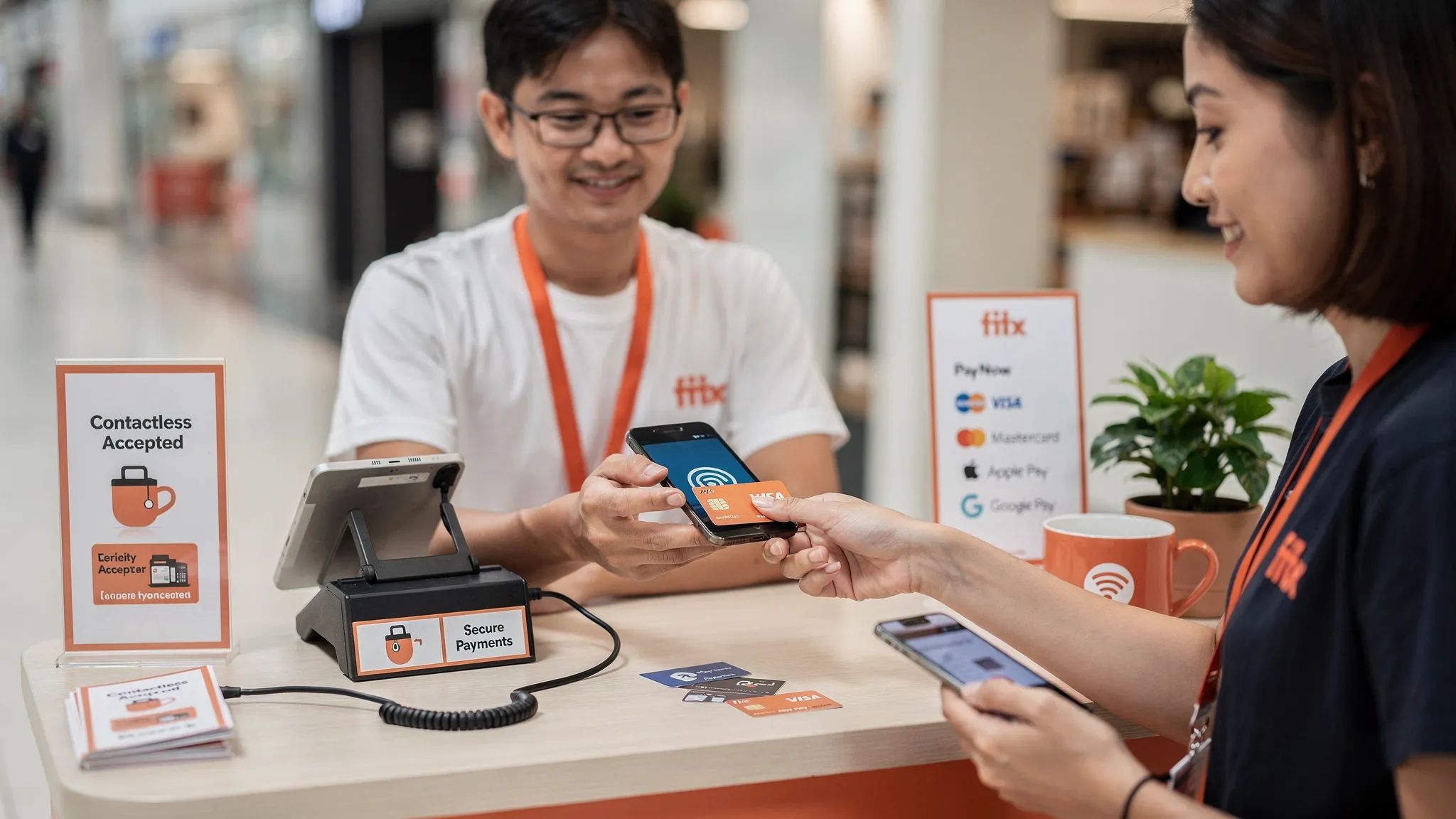
A local customer might want to scan a PayNow or SGQR code using their banking app. A younger shopper might want to tap an iPhone with Apple Pay or an Android phone with Google Pay. A tourist might expect to tap an international Visa, Mastercard, or Amex card stored in a mobile wallet. Another customer might simply expect your business to use a phone as the checkout device, especially at a pop-up, market, or mobile service visit.
That is why mobile checkout in Singapore should not be treated as one payment method. It is a checkout expectation. Customers want the payment moment to feel quick, familiar, and low effort.
For merchants, the practical answer is not to replace every method with one new app. It is to build a lean payment mix that covers the most common customer preferences while keeping costs and operations simple.
What customers expect at checkout in 2026
1. Fast confirmation, not payment uncertainty
The biggest expectation is speed, but speed does not only mean the transaction itself. Customers want to know immediately whether the payment worked.
With PayNow, customers may show a transfer confirmation screen. With cards and mobile wallets, customers expect a tap, a clear approval, and an immediate next step. Nobody wants to stand at a booth while staff refresh a banking app, search for a payment reference, or ask the customer to resend a screenshot.
This matters more in crowded environments such as fairs, roadshows, school events, and weekend pop-ups. A delay of 30 seconds per customer can create a queue. A queue can make the next customer abandon the purchase entirely.
2. Choice between PayNow, cards, and wallets
Singapore has strong PayNow adoption, and for many local low-value purchases it remains a sensible option. Through SGQR, businesses can present one standard QR code that supports participating payment schemes. The Monetary Authority of Singapore describes SGQR as a unified QR code standard designed to simplify QR payment acceptance for merchants.
But cashless does not mean PayNow-only. PayNow works best for customers with access to Singapore bank accounts. It is less useful for tourists, new arrivals, visiting relatives, foreign clients, and some corporate buyers. These customers often expect to tap a card or mobile wallet.
Cards also matter for higher-value purchases. A customer buying furniture, fragrance sets, skincare packages, tuition blocks, private transport, or home services may prefer card payments for rewards, credit, chargeback protection, or expense tracking.
A practical 2026 checkout should therefore give customers choice without overwhelming your staff. For many small businesses, that means keeping PayNow for local bank transfers and adding contactless card acceptance for customers who prefer cards or cannot use PayNow.
3. A contactless experience that feels normal
Customers are used to tapping cards and phones at supermarkets, MRT gantries, taxis, cafes, and department stores. This shapes their expectations even when buying from a small business.
At a pop-up booth, the customer may not expect a large countertop terminal. But they do expect the payment experience to be modern. If your staff can enter the amount on a phone and let the customer tap their card or mobile wallet, the checkout feels familiar without needing bulky hardware.
This is where Tap to Phone and Tap to Pay on iPhone have changed the merchant experience. Instead of pairing a Bluetooth reader or renting a traditional terminal, eligible merchants can accept contactless card payments using a compatible smartphone and a payment app. For nashi, this is available on Android and iOS.
4. Confidence that the payment is secure
Customers may not know the technical details of tokenisation, NFC, PCI compliance, or payment processing. But they do notice whether checkout feels trustworthy.
A professional checkout experience includes a clear amount, an obvious tap point, confirmation that payment is approved, and a simple way to handle refunds if something goes wrong. For service businesses, this is especially important because payment often happens outside a traditional shop counter, such as at a customer’s home, at a studio, in a vehicle, or at an event venue.
Security is also a brand signal. When a business can accept contactless cards and mobile wallets professionally, customers are less likely to wonder whether they should have brought cash or whether a manual transfer will be recorded properly.
Mobile checkout expectations by customer type
Different customers do not all want the same thing. A small business in Singapore should think about payment expectations by customer segment, not just by transaction method.
Customer type | Likely checkout expectation | Merchant implication |
|---|---|---|
Local everyday customer | PayNow, PayLah!, card, or mobile wallet | Keep QR options visible, but also support tap for convenience |
Tourist or short-term visitor | International card or mobile wallet | PayNow alone may lose the sale, since many visitors cannot use it |
Higher-value buyer | Card payment for rewards, credit, or records | Offer contactless cards for bigger tickets, deposits, and packages |
Corporate or expat customer | Card acceptance and clear confirmation | Make payment feel formal and easy to reconcile |
Event or pop-up shopper | Fast tap or scan with minimal waiting | Avoid hardware bottlenecks and train staff on a simple flow |
Mobile service customer | Pay at the location where service is completed | Use a portable option that does not require a fixed counter |
The key lesson is simple: customers do not judge your checkout by your company size. They compare it with every other payment experience they have had that week.
Where PayNow still wins, and where it falls short
PayNow remains one of the best tools for Singapore businesses. It can be low cost when set up through a bank, familiar to local customers, and easy to display with a QR code. For very low-ticket purchases, especially where card fixed fees would hurt margins, PayNow may be the better default.
But PayNow has limits. It depends on local banking access. It can create manual reconciliation work if customers key in the wrong amount or forget to include a reference. It may also feel less natural for customers who want to use a credit card, collect points, pay with an overseas wallet, or separate business and personal expenses.
The most resilient approach is not PayNow versus cards. It is PayNow plus cards. If you want a deeper comparison, nashi’s guide to mobile payment methods in Singapore breaks down how PayNow, cards, and wallets fit different merchant use cases.
What small businesses should change at checkout
Mobile payment expectations are not only about technology. They are also about how you present and operate checkout.
A good checkout flow in 2026 should be clear before the customer asks. Display accepted payment methods near your counter, booth, reception desk, or service invoice. Train staff to offer the best option based on the customer’s situation. For example, PayNow may be easiest for a local repeat customer, while card tap may be better for a tourist, expat, or larger purchase.
Avoid making the customer solve the payment problem. If a customer wants to pay by card and you only accept bank transfer, the friction is on them. If a customer wants to scan PayNow but your QR code is hidden behind the counter, the friction is also on them.
A practical payment mix for Singapore micro businesses often looks like this:
PayNow or SGQR for local bank transfer payments and low-ticket transactions.
Contactless cards for customers who prefer Visa, Mastercard, or Amex.
Mobile wallets such as Apple Pay and Google Pay when they are routed through contactless card acceptance.
A simple refund process for deposits, cancellations, exchanges, and partial adjustments.
A mobile-first acceptance option for pop-ups, home visits, events, and on-the-go selling.
This mix keeps the experience simple while covering most real-world checkout moments.
Common checkout mistakes that frustrate customers
The first mistake is assuming that PayNow covers everyone. It covers many local customers, but not every customer. If your business serves tourists, expats, visiting families, overseas clients, or transport customers coming from the airport, card acceptance can be important.
The second mistake is relying on payment hardware that does not fit how you sell. A traditional terminal may work well at a fixed counter, but it can be awkward for a business that moves between events, studios, showrooms, and client locations. Bluetooth card readers can help, but they add another device to charge, pair, carry, and troubleshoot.
The third mistake is choosing a payment platform with more features than you need. Some small businesses need inventory, SKU management, online checkout, invoicing, and a full POS. Many do not. If you only need to accept in-person card payments, a heavyweight system can slow onboarding and create unnecessary training work.
The fourth mistake is not calculating the real cost of payment acceptance. A monthly rental, hardware cost, subscription fee, per-transaction fee, international card rate, and refund process all affect the actual cost of getting paid. If you are comparing options, nashi’s guide to payment processing fees explains how to think beyond headline rates.
When Tap to Phone fits customer expectations best
Tap to Phone is especially useful when the merchant experience needs to be as mobile as the customer experience. Instead of asking customers to adapt to your payment setup, you bring payment acceptance to them.
This is a strong fit for Singapore businesses that sell at fairs, serve customers at home, run appointment-based services, operate small showrooms, or process occasional higher-value card payments. It is also useful for businesses that have relied on PayNow but now want to accept cards without buying or renting terminals.
For example, a personal trainer can collect payment after a session, a beauty service provider can accept a card at the client’s location, a furniture wholesaler can take a deposit at a showroom, and a pop-up brand can add a second checkout phone during busy periods.
nashi is built for this kind of in-person card acceptance. It turns an NFC-enabled Android phone into a contactless card payment terminal with no additional hardware, no Bluetooth accessory, no monthly subscription fee, and no annual contract. Customers tap their physical card or mobile wallet on the back of the merchant’s phone. nashi accepts Visa, Mastercard, and Amex, is PCI-DSS compliant, and is powered by Adyen’s payment infrastructure.
Onboarding is digital through the nashi app, and typical approval is within 1 business day when required documents are ready. Settlements are paid automatically to the merchant’s bank account in 2 business days, and full or partial refunds can be issued through the app.
For a step-by-step explanation of phone-based acceptance, read nashi’s guide on how to use Tap to Pay on your smartphone.
A 2026 mobile checkout checklist for Singapore businesses
Before adding another payment tool, review the full checkout moment from the customer’s point of view.
Can a local customer pay quickly with PayNow or SGQR?
Can a tourist or expat pay without needing a Singapore bank account?
Can customers tap Visa, Mastercard, Amex, Apple Pay, or Google Pay where relevant?
Can staff confirm payment immediately without checking multiple apps?
Can you process a refund or partial refund without a long manual workaround?
Can your payment setup move with you to events, pop-ups, showrooms, and client locations?
Are your fees, settlement timing, and card-type costs clear enough to plan cash flow?
Does your checkout feel simple enough for temporary staff or family helpers to use?
If the answer to several of these questions is no, your payment setup may be creating hidden friction. Customers may still complete the purchase, but the experience will feel less smooth than it should.
The bottom line for 2026
To pay with mobile is now part of everyday behaviour in Singapore. Customers expect checkout to support the way they already pay: scan when it makes sense, tap when they prefer cards or wallets, and receive quick confirmation every time.
For small businesses, the winning strategy is not to copy enterprise retailers or install a complex POS system by default. It is to offer the right mix of payment options, keep the checkout flow simple, and make sure your business can accept payment wherever the sale happens.
PayNow remains valuable. Cards remain essential. Mobile wallets are increasingly normal. Tap to Phone brings the merchant side of checkout into the same mobile-first world your customers already live in.
Frequently Asked Questions
What does pay with mobile mean for Singapore merchants? It can mean customers scanning PayNow or SGQR, tapping a phone with Apple Pay or Google Pay, using a mobile wallet linked to a card, or merchants accepting card payments directly on a smartphone through Tap to Phone.
Should small businesses replace PayNow with card payments? No. For most Singapore businesses, PayNow and card acceptance work best together. PayNow is useful for local bank transfers and low-value purchases, while cards help serve tourists, expats, higher-value buyers, and customers who prefer rewards or credit.
Can tourists use PayNow in Singapore? Most tourists cannot rely on PayNow because it is built around Singapore bank account access. Tourist-facing businesses should usually offer card or wallet acceptance in addition to PayNow.
What equipment do I need to accept mobile contactless card payments? With Tap to Phone, you need a compatible NFC-enabled smartphone, a payment app, and mobile data or WiFi. Traditional terminals and Bluetooth readers are other options, but they add hardware to buy, rent, charge, or pair.
Is Tap to Phone secure for card payments? Tap to Phone solutions should use secure contactless payment technology and comply with relevant payment security standards. nashi is PCI-DSS compliant and powered by Adyen’s payment infrastructure.
Make mobile checkout easier with nashi
If your Singapore business needs a simple way to accept in-person card payments, nashi helps you turn your phone into a contactless payment terminal. There is no extra hardware, no monthly subscription fee, and no annual contract.
Download the nashi app, complete digital onboarding, and start accepting Visa, Mastercard, and Amex on your Android or iPhone (iOS). Visit trynashi.com to learn how nashi can help your customers pay the way they expect in 2026.


