
nashi Team
5 min read
In 2026, customers rarely think about how they’ll pay until you can’t accept their preferred method. At that point, the sale becomes fragile, especially for small businesses competing on convenience.
The good news is you do not need to offer “everything.” You need a smart mix of payment methods that matches your customers, your average ticket size, and where you sell (countertop, mobile, online, or all three).
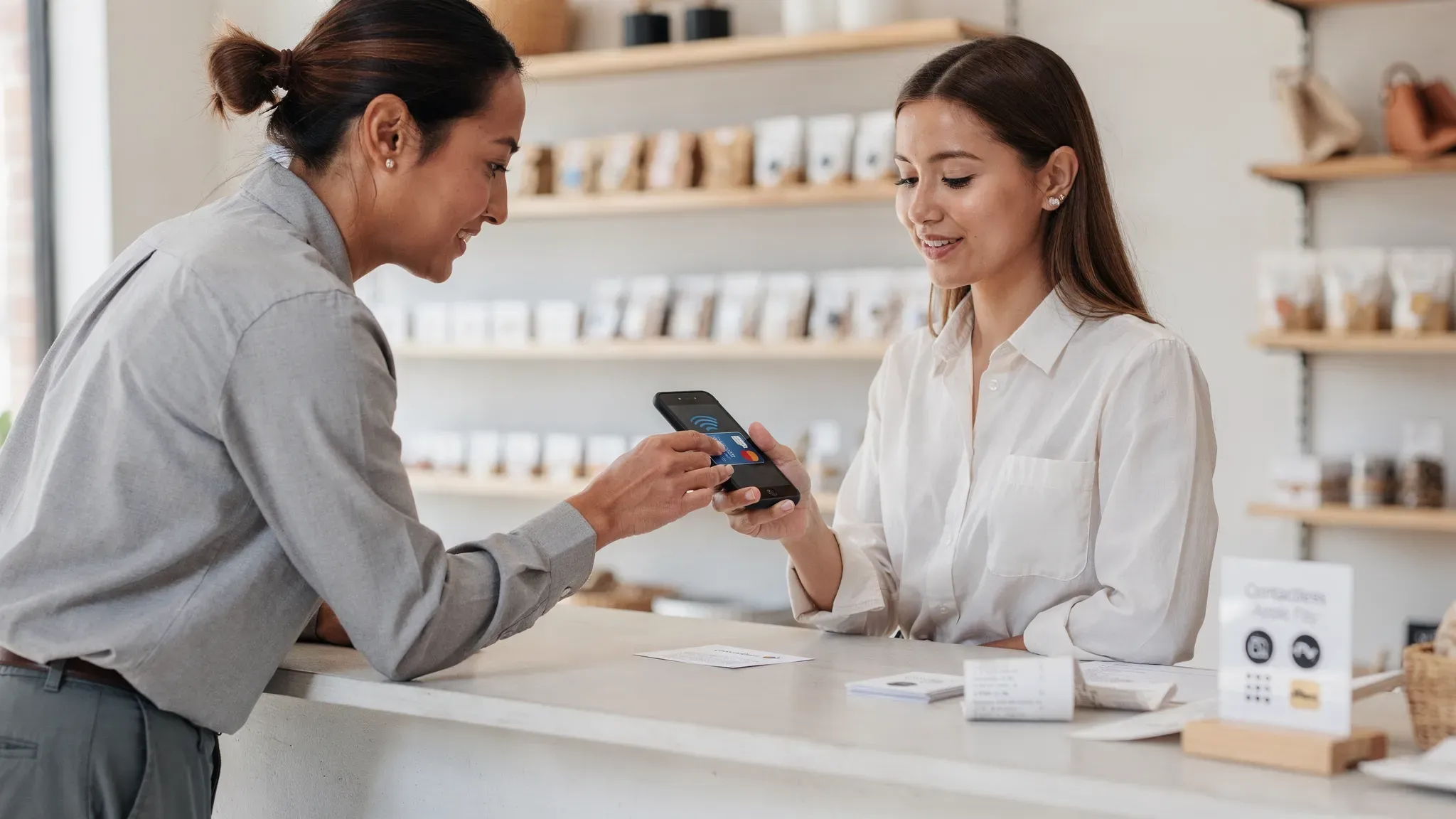
What customers expect at checkout in 2026
Across most markets, expectations have converged around three ideas:
Tap-first experiences: contactless cards, Apple Pay, Google Pay, and wearables.
Instant confirmation: a receipt, a payment success screen, or an immediate bank notification.
Choice without friction: customers want the option to pay their way without awkward workarounds.
In the US, the Federal Reserve’s ongoing research (Diary of Consumer Payment Choice) continues to document the shift toward electronic payments and the decline of cash-heavy behavior in many segments. That does not mean cash is gone, but it does mean “card and wallet acceptance” is increasingly treated as basic infrastructure, not a premium feature. (See the Federal Reserve payment diary research.)
Payment methods for small businesses to offer in 2026
Below are the methods that matter most, what they’re best for, and the trade-offs to plan around.
1) Card payments (credit and debit), especially contactless
What it includes: Tap (NFC), chip insert (EMV), and in some cases swipe (magstripe).
Why it belongs in your mix: Cards remain the most universal way to accept payments from locals and visitors, and contactless is now the default behavior in many everyday purchases.
Best for: Retail, quick-service food, services, pop-ups, events, and any business that serves tourists or cross-border customers.
Key considerations in 2026:
Hardware vs. no hardware: Traditional card terminals work, but they add setup time, logistics, and sometimes rental or contract commitments.
Tipping flows: If you’re in food, beauty, or personal services, make sure your checkout supports tipping in a way that feels natural.
Disputes and chargebacks: Cards can be disputed, so your provider’s reporting and evidence flow matters.
2) Digital wallets (Apple Pay, Google Pay, and contactless “tap” wallets)
Digital wallets are usually not a separate integration if you already accept contactless card payments, but they are worth calling out because they influence conversion.
Why wallets increase conversion: Customers do not need to find a physical card, and wallets use modern security techniques (like tokenization) that reduce exposure of the underlying card number. If you want a technical primer, EMVCo maintains an overview of payment tokenization concepts on its site: EMVCo Tokenisation.
Best for: Fast lines, premium retail, younger demographics, and any context where speed reduces walkaways.
3) Bank transfers and instant payments (good for larger tickets)
Depending on your country, this category includes ACH (US), Faster Payments (UK), SEPA Instant (EU), PayNow (Singapore), and other real-time rails.
Why it belongs in your mix: For higher ticket sizes or B2B-style transactions, bank transfers can lower processing costs and reduce chargeback exposure.
Best for: Contractors, clinics, education, B2B services, custom orders, deposits, and invoices.
Trade-offs:
Customer experience can be clunky if the transfer requires manual steps.
Refunds are not always as simple as card refunds.
Reconciliation can be more manual unless you use references and good bookkeeping workflows.
4) QR code payments (great locally, mixed for tourists)
QR payments can be extremely fast and low-friction when customers already use them regularly.
Best for: Cafes, hawkers/market vendors, service counters, local neighborhood retail.
Watch-outs:
QR rails can be highly local. If you serve tourists, you’ll likely still want card acceptance.
Static QR codes can be prone to “wrong amount” errors if customers manually type amounts.
5) Cash (still useful, but optimize for exceptions)
Cash is no longer the primary method for many businesses, but it remains important in specific communities and for backup resilience.
Best for: Low-ticket items, tips (in some contexts), rural areas, and customers who budget with cash.
Trade-offs:
Counting, deposits, and shrink risk.
Slower reconciliation.
Harder to link to customer profiles or receipts.
A practical 2026 approach is to accept cash confidently, but design your operations so the business does not depend on it.
6) Pay-by-link and invoicing (especially for services)
If you sell services, custom work, or take orders by DM/phone, pay-by-link and invoice payments reduce back-and-forth.
Best for: Photographers, trainers, consultants, trades, event vendors taking deposits.
What to get right:
Clear payment terms (deposit vs. full, cancellation policy).
Automated receipts.
A way to record partial payments cleanly.
7) Buy Now, Pay Later (BNPL) for conversion-sensitive categories
BNPL can lift conversion for larger discretionary purchases, but it is not a default recommendation for every small business.
Best for: Higher-ticket retail (apparel bundles, electronics accessories, furniture decor), clinics offering elective packages (where permitted), and seasonal spikes.
Trade-offs:
Fees can be higher than standard card acceptance.
Returns and refunds can be operationally more complex.
Some customer segments perceive BNPL negatively, so offer it as an option, not a push.
8) Gift cards and store credit (simple retention lever)
Gift cards and store credit are not just “payments,” they are retention.
Best for: Salons, cafes, studios, boutique retail.
What to plan:
Expiration rules vary by jurisdiction.
Train staff on refunds vs. store credit policies.
A simple framework to choose your ideal payment mix
Instead of copying what a large retailer does, build around your reality.
Step 1: Map your primary selling context
Ask one question: Where does the payment happen most often?
At a counter
On the go (mobile)
Online
By invoice
Many small businesses are hybrid now, so pick your top two.
Step 2: Match methods to ticket size and customer type
Use this table as a starting point.
Business scenario | Must-have payment methods | Nice-to-have methods | Why it works |
|---|---|---|---|
Pop-ups, markets, mobile sellers | Contactless cards + wallets | QR payments, cash | Minimizes lost sales when customers only have a phone/card |
Cafe or quick-service food | Contactless cards + wallets, QR | Cash | Speed matters, lines kill conversion |
Boutique retail | Contactless cards + wallets | BNPL, gift cards | Higher AOV benefits from flexible options |
Service business (trainer, salon, home services) | Contactless cards + wallets, pay-by-link/invoice | Bank transfer | Mix of in-person and remote payments, deposits |
B2B and large invoices | Bank transfer, invoice payments | Card (for convenience) | Lower cost, clearer reconciliation for larger amounts |
Tourist-heavy locations | Contactless cards + wallets | Selected local QR wallets | Cards are the universal language for visitors |
Step 3: Decide what you will not offer
In 2026, offering fewer methods can be a feature if it keeps operations clean.
Common “not now” choices for small teams:
Checks (unless you’re in a niche that still relies on them)
Too many QR wallets that fragment reconciliation
BNPL before you have returns/refunds operationally stable
What to look for in a payment provider (to avoid surprises)
Most payment frustration is not about the tap itself, it’s about everything around it: fees, settlement, refunds, and support.
Pricing clarity: know what you’re actually paying
At minimum, get clear answers on:
Rate structure: flat rate vs. interchange-plus.
Fixed fees: per-transaction fixed fees can matter a lot on small tickets.
Monthly fees: subscription, statement, gateway, minimums.
Hardware costs: purchase, rental, replacement, or lock-in.
Cross-border and currency fees: relevant if you serve tourists.
If you want a deeper primer on fee components and why they exist (interchange, scheme fees, processor markup), the PCI Security Standards Council is a good starting point for the security side, and your local banking network documentation can clarify rail-specific charges.
Settlement and cash flow
Ask: When do funds hit my bank account, and what can delay settlement?
Even a “good” rate can hurt if settlement timing does not match payroll, inventory, or daily expenses.
Refunds and dispute handling
Make sure your tools support:
Simple refunds (without back-office gymnastics)
Receipts and transaction lookup for customer support
Dispute evidence workflows (for card payments)
Reporting and reconciliation
Small businesses do not need enterprise analytics, but you do need dependable basics:
Daily totals
Transaction history export
Payout reports that match your bank deposits
The 2026 shift: accept payments anywhere, without extra hardware
One of the biggest practical changes for small businesses is the mainstreaming of Tap to Phone (SoftPOS).
Instead of buying a terminal, you can turn a compatible smartphone into a contactless acceptance device. That’s a major unlock for:
Micro-merchants who cannot justify terminal costs
Mobile businesses that sell in multiple locations
Pop-ups and seasonal sellers
Teams that want a backup acceptance method even if they have a countertop POS

Example: a practical “modern minimum” payment stack for 2026
If you want a clean, low-maintenance setup that covers most customers, this is a strong baseline:
Contactless card + wallet acceptance for universal coverage
One local bank transfer or QR option (where it’s common) for low-cost local payments
Pay-by-link/invoice if you take deposits or remote orders
You can add BNPL and gift cards later, once your returns, refunds, and reconciliation are smooth.
How nashi fits into a 2026 small business payments strategy
If your priority is accepting contactless payments in person without buying extra hardware, nashi is designed around that need.
With nashi, you can use an Android phone to accept contactless card and digital wallet payments via Tap to Phone, with features built for small-business operations such as:
No hardware required
Tap to Phone payments
Instant sales tracking
Direct bank settlements
Flat per transaction fee
PCI-DSS compliant security
Simple refund processing
Supports cards and wallets
No monthly subscription
Free trial available
If you’re comparing options for in-person acceptance, you can start here: nashi Tap to Phone.
A 30-day rollout plan (without overcomplicating your checkout)
To implement the right payment methods quickly, keep it simple and operational.
Week 1: Decide the mix
Pick your “must-haves” based on your top two selling contexts (counter, mobile, online, invoice). Confirm you can cover tourists if that’s part of your foot traffic.
Week 2: Set up, test, and document
Run real-world tests:
A contactless card transaction
A wallet transaction (Apple Pay or Google Pay)
A refund
End-of-day reporting and settlement matching
Write a one-page SOP for staff: how to take payment, how to retry a declined tap, how to process a refund.
Week 3: Update your customer experience
Add clear signage at the point of sale (and on your checkout page if online). Many customers decide whether to buy based on whether you accept their preferred method.
Week 4: Review costs and drop what’s not working
After you have real data, review:
Effective fees as a percentage of sales
Refund and dispute frequency
The methods customers actually used
Then simplify. The best payment setup is the one your team can run flawlessly on a busy day.
The bottom line
The best payment methods for small businesses in 2026 are the ones that remove friction at the exact moment a customer is ready to buy.
Start with a strong baseline (contactless cards and wallets), add the one or two local methods your customers already use, and choose providers that are transparent about pricing, settlement, and refunds. If you want the flexibility to accept payments anywhere without extra equipment, Tap to Phone solutions like nashi can be a practical way to modernize quickly while keeping overhead low.


